Frontend/Markup
checkbox 커스텀, select All
두바이유
2020. 10. 29. 16:08
UI
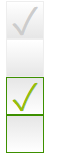
비활성화체크, 비활성화와 활성화체크 활성화
<!DOCTYPE html>
<html lang="en">
<head>
    <meta charset="UTF-8">
    <meta name="viewport" content="width=device-width, initial-scale=1.0">
    <title>Document</title>
    <style>
input[type="checkbox"] {
    display: none;
}

label:before {
    background: linear-gradient(to bottom, #fff 0px, #e6e6e6 100%) repeat scroll 0 0 rgba(0, 0, 0, 0);
    border: 1px solid #035f8f;
    height: 36px;
    width: 36px;
    display: block;
    cursor: pointer;
}
input[type="checkbox"] + label:before {
    content: '';
    background: linear-gradient(to bottom, #e6e6e6 0px, #fff 100%) repeat scroll 0 0 rgba(0, 0, 0, 0);
    border-color: #3d9000;
    color: #96be0a;
    font-size: 38px;
    line-height: 35px;
    text-align: center;
}

input[type="checkbox"]:disabled + label:before {
    border-color: #eee;
    color: #ccc;
    background: linear-gradient(to top, #e6e6e6 0px, #fff 100%) repeat scroll 0 0 rgba(0, 0, 0, 0);
}

input[type="checkbox"]:checked + label:before {
    content: '✓';
}
    </style>
</head>
<body>
    <div><input id="cb1" type="checkbox" disabled checked /><label for="cb1"></label></div>
<div><input id="cb2" type="checkbox" disabled /><label for="cb2"></label></div>
<div><input id="cb3" type="checkbox" checked /><label for="cb3"></label></div>
<div><input id="cb4" type="checkbox" /><label for="cb4"></label></div>
</body>
</html>
자바스크립트
checkbox all
See the Pen MWeQBzp by LeeEugene1 (@leeeugene1) on CodePen.
반응형